The transition from traditional broadcast television to Internet Protocol Television (IPTV) has been one of the fastest-growing tech trends in Ireland over the last five years. As high-speed fiber broadband becomes the standard from Dublin to Donegal, more households are ditching the satellite dish in favor of the streamlined, app-based experience offered by Smart TVs.
However, for a beginner, the initial setup can feel daunting. Terms like “M3U URLs,” “EPG,” and “MAC Addresses” often confuse users who just want to watch the match or the evening news. This comprehensive guide is designed to take you from unboxing your TV to enjoying a premium IPTV Ireland experience in a few simple steps.
Why Use a Smart TV for IPTV?
The primary advantage of using a Smart TV for IPTV is simplicity. By using the hardware already built into your television, you eliminate the need for:
- Extra HDMI cables.
- Additional remote controls.
- External “clutter” like set-top boxes or streaming sticks.
Modern Smart TVs from Samsung (Tizen OS), LG (webOS), and Sony (Android/Google TV) have powerful processors capable of handling 4K streams with ease, providing a “native” feel to your channel surfing.
Phase 1: Pre-Setup Essentials
Before you begin the software installation, you must ensure your environment is ready. A poor foundation is the leading cause of “buffering,” which is often unfairly blamed on the provider.
1. Internet Speed and Stability
To stream in Ultra HD (4K), you need a stable connection. While 25 Mbps is the minimum recommended speed per device, for a seamless experience, we recommend a 50 Mbps+ plan.
- Pro Tip: If your router is near your TV, always use an Ethernet cable instead of Wi-Fi. It provides a consistent data flow that Wi-Fi—which is prone to interference from other household devices—cannot match.
2. Choosing Your Subscription
Not all services are optimized for Irish ISPs. When selecting your provider, ensure they offer local Irish servers to minimize latency. You will receive a set of credentials (usually a Username, Password, and a Server URL) or an M3U link. Keep these safe.
Phase 2: Choosing the Right IPTV App
A Smart TV is just a monitor until you install a “player.” Think of the player as the engine and your subscription as the fuel. Here are the top-rated apps in Ireland for 2026:
For Samsung and LG Users:
Since these TVs use custom operating systems, you are limited to the apps in their respective stores.
- IPTV Smarters Pro: The most popular choice globally. It’s user-friendly and supports “Catch-up” TV.
- IBO Player: A fast, paid app (usually a small one-time fee) that is highly stable for large channel lists.
- Smart IPTV (SIPTV): The “old school” reliable choice that uses your TV’s MAC address for activation.
For Sony, Philips, and Android TVs:
- TiviMate: Widely considered the best IPTV player in existence. Its interface looks exactly like a high-end cable box.
- GSE Smart IPTV: Great for those who want deep customization options.
Phase 3: Step-by-Step Installation Guide
While every app varies slightly, the core process remains the same. Here is the standard workflow for the most popular method: the Xtream Codes API.
Step 1: Install the Player
Go to your TV’s App Store (Samsung Apps, LG Content Store, or Google Play Store). Search for “IPTV” and download your chosen player (e.g., IPTV Smarters).
Step 2: Enter Your Credentials
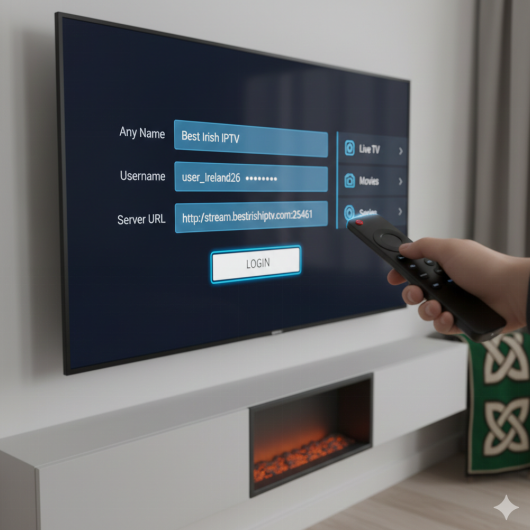
When you open the app, select “Add New User” or “Login with Xtream Codes API.” You will be asked for:
- Any Name: (e.g., “Best Irish IPTV”)
- Username: (From your provider)
- Password: (From your provider)
- Server URL: (e.g., http://example.com:8080)
Step 3: Downloading the Content
Once you click login, the app will take a few moments to “Download Live Channels, Movies, and Series.” On a standard Irish connection, this takes about 30–60 seconds.
Step 4: Enjoy
You can now browse through categories such as Irish Locals, UK Sports, US Entertainment, and 24/7 Kids’ channels.
Phase 4: Troubleshooting Common Issues
Even with the best setup, you might encounter a few hiccups. Here is how to fix them like a pro:
The “Data Error” or “Login Failed” Message
90% of the time, this is a typo. IPTV URLs and passwords are case-sensitive. A single misplaced period or an accidental space at the end of a username will prevent the connection. Double-check your credentials exactly as they appear in your activation email.
Buffering or Freezing
If the image freezes:
- Restart your Router: This clears the “cache” and often assigns your TV a fresher, faster path to the internet.
- Check for App Updates: Developers frequently release patches to fix bugs with newer TV firmware.
- VPN Usage: Some Irish ISPs (Internet Service Providers) may “throttle” video traffic during big sporting events. Using a VPN on your Smart TV can often bypass these restrictions and provide a smoother stream.
Phase 5: Advanced Optimization (EPG and Groups)
Once you are comfortable with the basics, you can optimize the experience.
Setting Up the EPG (Electronic Program Guide)
The EPG is what shows you what is currently playing and what is coming up next. Most premium apps will load this automatically, but if your guide is empty, you can manually input the “EPG URL” provided by your service. This transforms your TV into a professional media hub.
Organizing Favorites
Don’t scroll through 15,000 channels every time you want to find RTÉ 1. Most apps allow you to “Long Press” the OK button on your remote to add a channel to your Favorites folder. This keeps your most-watched Irish and Sports channels just one click away.
Summary: Your Path to Better TV
Setting up IPTV on your Smart TV is the single best way to modernize your home entertainment in Ireland. It offers a level of variety and flexibility that traditional cable simply cannot match. By following this guide, you ensure that your setup is professional, stable, and ready for years of viewing.
If you ever get stuck or need more specific visual walkthroughs, you can always refer to our detailed, device-specific IPTV setup ireland manuals which cover every brand from Firestick to Mag Boxes.